head
Showing posts with label Common Core. Show all posts

Thursday, January 17, 2013

Black Out Poetry


I've been working on getting together a more comprehensive poetry unit together this year. 


Those worked great for getting the essentials into my kids' heads, but I have been looking at how to pull in the "Fun" side now. 

I keep seeing "Black out Poetry" on Pinterest:


And on Tumblr 

Neat right?!

Here are so of my ideas on how I can incorporate it into the classroom.

  • Gather supplies
    • Who doesn't have a buttload of magazines in their house collecting dust (just make sure they are not Cosmopolitan or something equally as raunchy!)
    • Beg, Borrow, and Steal old newspapers (my school librarian will give me the old ones for free and so will the art teacher!)
    • Go to used bookstores and pick up a few .25 cent books (One book would probably even have enough pages for each student to complete two or more of these!)
  • Explain the assignment to your students
    • I plan to start with this quote that I use in my prezi:
      • Poetry is thoughts that breath and words that burn -Thomas Gray
    • Tell students that you are going to give them a piece of writing and they are going to turn that existing piece of writing into up-cycled poetry!
    • Have them read that piece of writing and pick one word that "burns" or speaks to them and circle it
    • Have them design the rest of their poem around this word (Not what is written on the page) by circling words that they would like to incorporate. 
    • There are no rules other than they must only use the words on the page.
    •  They can go up or down the page as they wish (just make sure they draw arrows to explain the correct order!)
  • Designing the art
    • Once they have their words chosen they can design the pages. They can use any art medium they wish!
    • Students don't have to be artistic to do this because they can create abstract pieces. They just need to make sure that their words stand out! 
  • Alternate option
    • Have students sit in a circle giving each student their own page. They choose the "burn word" and then pass it to the next student in the circle who will choose the next word. Students keep passing the paper until they get their original paper back. Have the students design the art and then read the poems aloud!


Monday, January 14, 2013

Prezi- Creating a simple presentation


One of the things (Besides my complete English curriculum) I am best known for on my teacher stores is my Prezis.

I discovered Prezi about three years ago and I LOVE it!

Prezi is similar to a PowerPoint in that they are both presentation tools, but that is where their similarities end. 

Prezi Presentations are created on a "canvas" rather than on "slides." This helps to encourage focusing on combining text, pictures and video clips. Items on the canvas can be dragged, tilted, and zoomed to create an engaging look that really grabs students attention. Prezi Presentations are also FANTASTIC for hitting many learning styles at once (especially if you include video clips and pictures like I do) 


I personally like incorporating video clips in my Prezis as much as possible (the kids enjoy that as well). I think it is also beneficial for students to see the literary elements we discuss in class brought to life in video clips and in pictures. 


I thought I would take some time in this post to explain how to make a simple prezi!

Once you have signed up for an account at Prezi.com click the blue "+ New Prezi" button.

Step one: 

Choose a template. I am choosing "Blank" because I want to upload my own image next!
Step Two:
This is your bland and boring main prezi screen. Now let's have some fun creating!
Click "Template in the top bar"
Step Three
Click "Customize Current Theme"
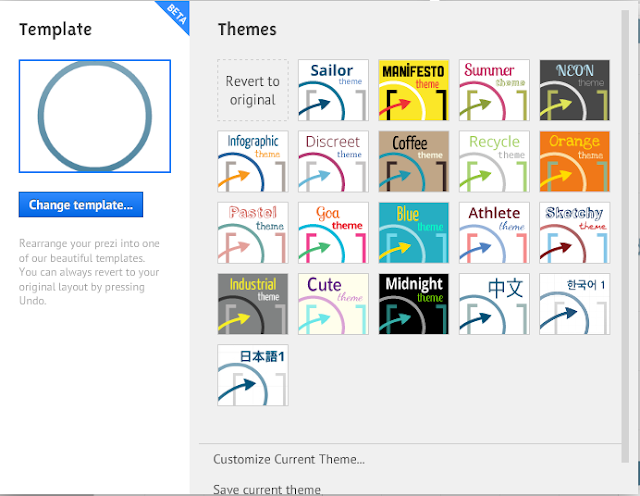

Step Four
Click "Upload" underneath 3D background and upload a picture from your computer, whatever you would like your background to be. I have chosen a picture of my dogs for the purpose of this tutorial!

Step Five
Once you have uploaded your picture, choose colors that will compliment the picture and choose fonts. Keep clicking the "Next" button until you have chosen all the options possible and once you have click "Done"


Step Six
If your picture is too large scroll out until it fits in the little box on the left. Click "+Add Frame" and choose "Draw Invisible Frame" and draw a frame around your picture. (I like to do this so the picture is centered and becomes the main backdrop, but you do not have to do this!)

Step Seven
You are ready to start adding information to your prezi! Click anywhere on your uploaded picture to add text. 
I would suggest placing text in fun places on the picture. Look for places that are fairly solid in color so the text can stand out. All you have to do is use your mouse to scroll into the picture to place the text on fun and dynamic places!
TIP: The more you tilt and space your text the more fun and dynamic the path will be later on
In order to tilt text, images, videos, etc...all you have to do is click the item and go to one of its four corners. A little circle will appear and that will enable you to tilt the object. 

Step Eight
I like to add images to my prezis. To do this click "Images" in the top bar and upload an image from your computer or from google (That part is self explanatory). I want to place this picture in the center of my dog's eye so I 
  • Click on the picture
  • Click on the "-" button until it is the size I want it to be
  • Click the hand button to move the picture into the correct location 
The same rule for images applies for adding video clips to a prezi. You can put links from youtube in or you can place embedded videos in your prezis. 

Step Nine
Once you have added all the content you would like to add it is time to create the path! 
  • Click "Edit Path" 
  • Click on the items in the order you would like them to appear (They will be highlighted and raise slightly when you pass your mouse over them)
  • When you click on each item it will add screen shots of the order in the gray bar on the left and a spider web of the pathway will appear on your image. 
  • If you forget a path point you have two options:
    • The plus signs can be dragged to place a path point on items
    • The screen shots can be dragged up and down in the gray bar on the left to change the order
  • When you are satisfied with your path click "edit path"again to close it. 


Check out your presentation by clicking "Present" in the top bar in blue. Use the arrow keys on your keyboard to move forwards and backwards. When you are done click "esc"on your keyboard or click the X in the top right hand corner. 

Step Ten
When you are satisfied with your prezi click the square box with the arrow pointing to the right to save and close your prezi! You can watch your prezi online, or you can download it to your computer! (Just make sure that if you download it to your computer you know how to unzip a compressed folder).

Prezis are very simple to create!

I am going to do a series of prezi tutorials in future so keep checking back!

Prezis I have created that are for sale:
Context Clues
Writing Process
Plot Diagram
Night Pre Reading 
Making Inferences
Text Structure 
Figurative Language
Comparative and Superlative Adjectives
Point of View
Theme
Outsiders Pre Reading
Tone and Mood
The Giver Pre Reading 
Foreshadowing
Poetry Terms
Hunger Games Pre reading
Catching Fire Pre Reading
Symbolism
Conflict
Ancient China
Anthem Pre Reading
Monster Pre Reading 
Animal Farm Pre Reading
Free Learning Styles Prezi 


Sunday, January 13, 2013

Classroom Organization- Copying Ahead of Time


One of the things that I started doing last year is making six weeks worth of copies at a time (we are on a six week grading period). 

One of my other co-workers did this and swore by it but I never really understood how it was possible until I started doing it. Now *I* swear by it and will never look back!


How I do it 
(I'm going to do 1 week as an example)
When we are nearing the end of another six weeks I pull out my weekly lesson template folder

I take look at what papers I will need by looking at my weekly template and making a list of what they are and the amount of pages there are

Here is the list I would make for this weekly template:
  • RPS #5 List, Worksheet, Quiz----6 pages
  • Point of View in Songs----4 pages
  • Intro to Symbolism----8 pages
  • Symbolism in Songs----4 pages
  • Point of View Quiz----4 pages
  • Theme Quiz----2 pages
  • Homework Form----2 pages
This totals 30 pages but because I print front to back I divide this number by 2 and multiply it by 75 (The total number of students I have) 

The amount of paper that I will need for this particular week's worth of copies is: 1125 sheets or 2.25 reams

Now that I have the math portion out of the way I gather the binders/worksheets I need from my bookshelf. 
Check out my post on: Organizing Classroom Files

I head to the copy room and pray that the copy machine is working!


Sometimes my mentee/coworker and I stay after school, order chinese food, and make copies together. With two of us making copies it can take about 3 hours (For the entire 6 weeks worth), but we have fun while we are doing it (One day we will find out that copy toner is a silent killer. It's all fun and games until someone gets poisoned)

When are the copies are finally done I place them in construction paper holders that I have purchased over the years. 

I have not labeled the construction paper cubbies yet because I couldn't figure out how, but today I found this great pin!


Now that I make my copies ahead of time my planning period can be spent grading papers, having coffee, complaining in a coworker's room, or tutoring. 

I also am not running around like a chicken with its head cut off trying to get things ready for each day!

The up front work is completely worth it!

Thursday, January 10, 2013

My Teacher Stores


A year and a half ago I opened my Teacherspayteachers store and it has slowly grown over time!

I've loved the fact that things that I actually use in my classroom have become useful to others as well!


Items available in my stores: 

Foreshadowing
*    Foreshadowing Prezi
*    Foreshadowing Test
*    Identifying Foreshadowing in Songs
*    Foreshadowing Charts for 4 stories
*    Foreshadowing Lesson Plan
*    Conflict, symbolism, foreshadowing in Red Riding Hood Movie

Figurative Language
*    Figurative Language in Popular songs
*    Figurative Language Prezi
*    Figurative Language Prezi Version One
*    Identifying Figurative Language in Music Activity
*    Figurative Language PowerPoint and Game
*    Figurative Language Sort
*    Figurative Language Lesson Plan
*    Figurative Language Homework Sheet
*    Figurative Language Quiz  

Symbolism
*    Disney Color Symbolism Activity
*    Identifying Symbolism in Songs
*    Identifying, explaining, and understanding Literary Symbolism
*    Literary Symbolism Prezi
*    Symbolism In Dreams Activity
*    Symbolism test with Answer Key
*    Technology Symbolism Activity
*    Symbolism Lesson Plan
*    CSI Symbolism Powerpoint review game

Point of View
*    Explore the three types of point of view!
*    Identifying Point of View Practice worksheets
*    Point of View in Songs Activity
*    Point of View Prezi
*    Point of View Test with Key
*    Point of view Lesson Plan
*    Three types of Point of View Powerpoint

Conflict
*    Conflict Assignment Utilizing Technology
*    Conflict Test with Key
*    Literary Conflict PowerPoint
*    Literary Conflict Prezi
*    Conflict Lesson Plan

Inferences
*    Inference Activity/Worksheet (Learn from my Fail)
*    Making Inferences Activity using Pictures
*    Making Inferences Prezi
*    Making Inferences Prezi New Version
*    Inference PowerPoint
*    Twitter Ordeal by Cheque activity
*    Inference Lesson Plan
*    What is it inference activity
*    The house Inference Activity
*    Made out of Meat Inference Activity
*    Inference Test

Theme
*    Identifying and finding Theme
*    Identifying Literary Theme in Popular Songs
*    Literary Theme PowerPoint
*    Literary Theme Prezi
*    Theme Test with Answer Key
*    Theme Lesson Plan
*    Theme Homework option  

Tone and Mood
*    Author's Tone Activity Worksheet
*    Author's Tone and Mood Prezi
*    Author's Tone and Mood Test with answer key
*    Tone and Mood in Songs activity and PowerPoint
*    Tone and Mood Lesson Plan

Plot Diagrams
*    Plot Diagram Prezi Presentation
*    Identify Elements of Plot Diagram in Songs

Hunger Games
*    Hunger Games Pre Reading Prezi
*    Hunger Games Project (soundtrack)

The Outsiders
*    The Outsiders Pre Reading Prezi
*    Complete and Creative Outsiders Novel Study

Monster
*    Monster by Walter Dean Myers Complete Novel & Unit Study
*    Monster by Walter Dean Myers Pre Reading Prezi

Night
*    Complete Night by Elie Weisel Novel Study

The Giver
*    The Giver by Lois Lowery Pre Reading Prezi

Anthem
*    Anthem Pre Reading Prezi
*    Anthem Chapter Questions
*    Comparing Animal Farm to Anthem Essay
*    Anthem Lit Circle Projects

Animal Farm
*    Animal Farm Pre Reading Prezi
*    Animal Farm Allegories
*    Animal Farm Chapter Questions

Catching Fire
*    Catching Fire pre reading Prezi and handout

Lesson Plans and Teacher Resources
*    Entire year of Daily and Weekly Lesson plans for 8th grade English
*    Lesson Plans for the 2012-2013 year
*    180 slides of Daily Bell work/Warmups/Bell Ringers for English
*    25+ English Substitute Plan activities and forms
*    Letters to parents/guardians
*    Cheating Form
*    Student Behavior Tracker
*    Behavior Log
*    Classroom Rules

Entire Washington D.C. Field trip Forms
*    National Air and Space Museum Field Trip Questions National
*    American History Museum Field Trip Questions National
*    Archives Field Trip Questions
*    National Gallery of Art Field Trip Questions
*    National Museum of the American Indian Field Trip Questions
*    Nationals Baseball Game field trip
*    Washington D.C. Field Trip
*    Washington D.C. National Mall Field Trip Questions
*    Washington D.C. Prezi Sample
*    Fort McHenry Field Trip Questions
*    Baltimore Aquarium Field Trip Forms

Writing and Editing
*    Step by Step grammar and punctuation Powerpoint
*    Punctuation/Grammar RAFT
*    How to Write an Essay using Step up to Writing (New and Old versions)
*    Complete Writing and Editing/Proofreading Unit
*    Comparative and Superlative Adjectives Prezi
*    Adjectives Practice and Descriptive Writing
*    25page Bundle of Writing prompts, writing checklist, writing rubric
*    Writing BINGO for differentiated instruction or early finishers
*    Writing Process Prezi with handout

Root Words and Context
*    A-Z Common Root Words Activity
*    Entire year of Root Word, Prefix, Suffix Practice (With answer Key)
*    Updated!!!Entire year of Root Word, Prefix, Suffix Practice (With answer Key)
*    Visual Root Words Part 1

Static and Dynamic
*    Static and Dynamic Character PowerPoint using Shel Silverstein
*    Static or Dynamic Quiz with Answer Key

Miscellaneous Extras
*    Reading and Writing BINGO for differentiated instruction or early finishers
*    Persuasive Writing Activity (cross curricular math and history
*    Literary Terms Flash cards with graphics
*    Essential Questions or exit slips for English
*    English Test Bundle: 8+ tests with answer key
*     Comparing and Contrasting Poetry
*    Career Research Project and PowerPoint
*    First Day of School Learning Styles and Prezi
*    Learning Styles Activities
*    RAFT for writing
*    Texting vs Formal vs Informal Language
*    English in the Real World
*    Character Cell Phone Hacks
*    New Years Goal setting activities
*    Differentiated-Questioning-and-Real-World-Application-Full-Bundle

PowerPoints
*    Career Research Project and PowerPoint
*    Static and Dynamic Character PowerPoint using Shel Silverstein
*    Three types of Point of View Powerpoint
*    Literary Conflic PowerPoint
*    Literary Theme PowerPoint
*    Tone and Mood in Songs activity and PowerPoint
*    180 slides of Daily Bell work/Warmups/Bell Ringers for English
*    Entire year of Random Fact of the day
*    Entire year of Journal Questions
*    540 Slides of Daily Bell work/Warmups/Bell Ringers for English
*    Step by Step grammar and punctuation Powerpoint
*    How to Write an Essay using Step up to Writing

Identifying Literary Elements in Songs
*    Identify Elements of Plot Diagram in Songs
*    Tone and Mood in Songs activity and PowerPoint
*    Identifying Literary Theme in Popular Songs
*    Point of View in Songs Activity
*    Identifying Symbolism in Songs
*    Figurative Language in Popular songs
*    Identifying Foreshadowing in Songs

Prezis
*    Ancient China Prezi
*    Writing Process Prezi with handout
*    Washington D.C. Prezi Sample
*    Monster by Walter Dean Myers Pre Reading Prezi
*    The Outsiders Pre Reading Prezi
*    Catching Fire Pre Reading
*    Hunger Games Pre Reading Prezi
*    Plot Diagram Prezi Presentation
*    Author's Tone and Mood Prezi Literary Theme Prezi
*    Making Inferences Prezi
*    Making Inferences Prezi New Version Literary Conflict Prezi
*    Point of View Prezi Literary Symbolism Prezi
*    Figurative Language Prezi
*    Figurative Language Prezi Version One
*    Night by Elie Wiesel Pre reading Prezi
*    The Giver Pre Reading Prezi
*    Foreshadowing Prezi
*    Poetry Elements Prezi
*    Anthem Pre Reading Prezi
*    Animal Farm Pre Reading Prezi


Everything is editable to your needs

Can be bought as either a flash drive (free shipping) or a digital download!

Feel free to contact me at: Kmpotter05@yahoo.com